Local development
Last updated: 2026-01-30
One-stop devcontainer with Devpod
Devpod makes local environment setup unneccessary. We provide a prebuilt devcontainer that is always up-to-date with respect to the dev branch of the project.
Installing docker and devpod
The only requirements are installation of docker and devpod.
Installation instructions for docker and devpod can be found at https://docs.docker.com/get-started/get-docker/ and https://devpod.sh/docs/getting-started/install.
Devcontainer setup
All containerized
After installation, you can configure devpod to use docker as its provider for the development containers.
You can then create your workspace by pointing to the github repo and choosing your IDE:
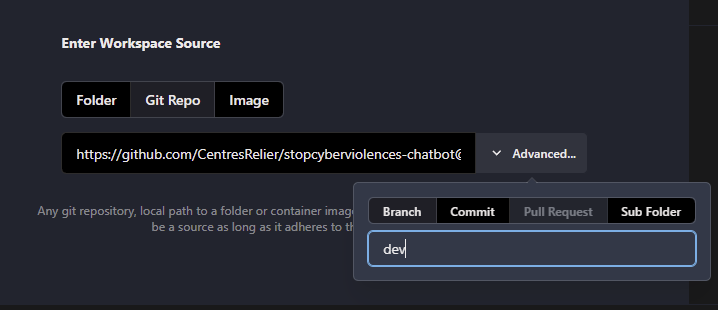
CLI users type:
devpod up git@github.com:CentresRelier/stopcyberviolences-chatbot@devThis will pull the corresponding devcontainer and setup a browser-based version of VScode (openvscode) at localhost:10800. Optionally, you can choose to connect via the GUI version of VSCode:
devpod up git@github.com:CentresRelier/stopcyberviolences-chatbot@dev --ide vscodeLocally cloned repo
If you prefer cloning the repo manually, you can still use the devcontainer for an isolated developement environment.
In the repo root directory run:
devpod up . --id cloned_repo --ide ...Devpod persistence
Good news: The devcontainers / devpod workspaces create as described above are persistent, until you delete them.
Manual environment preparation
Follow the steps below, if you prefer manual environement management.
Package managers and environment creation
We recommend a combination of mamba (conda) (non-python dependencies) and uv (python dependecies) for environment management.
Clone repository
git clone https://github.com/CentresRelier/stopcyberviolences-chatbot.git
cd stopcyberviolences-chatbot
Backend environment
# create and activate mamba env
mamba create -n stopcyber_backend -c conda-forge uv
mamba activate stopcyber_backend

# nest uv .venv
uv venv
uv pip install -r ./api/requirements.txt

# activate .venv
source .venv/bin/activate
Frontend environment
mamba create -n stopcyber_frontend -c conda-forge nodejsDevelopment setup
These steps apply for both the local and devcontainer environment.
- Launch React dev server (optional, a terminal client is currently in development for backend only work)
cd frontend/
npm run dev
### Output:
VITE v5.4.14 ready in 1481 ms
➜ Local: http://localhost:5173/
➜ Network: use --host to expose
➜ press h + enter to show help
###- Launch backend
# from app repo ./api
python run.py
Make sure all necessary env vars are set correctly (see App settings in api/config.py).
- (Optional if remote) Forward ports
ssh user@ip_to_remote -NL 5173:localhost:5173
ssh user@ip_to_remote -NL 8000:localhost:8000