Agentic framework and structure
Last updated: 2026-02-18
Agentic framework and structure
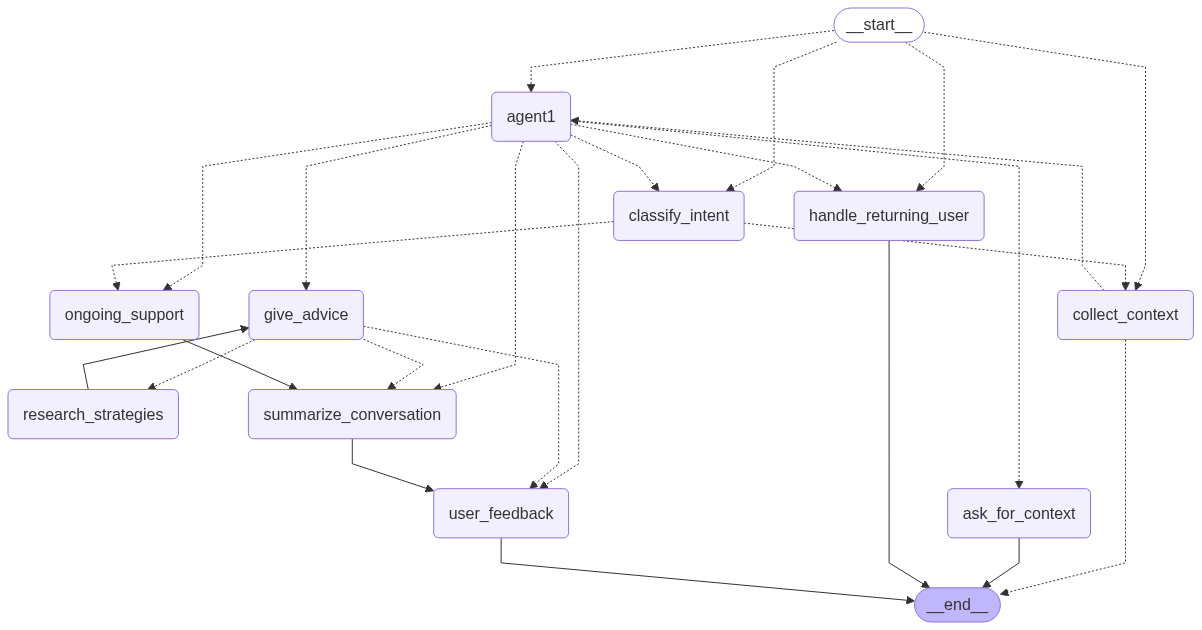
service1 agent. This diagram is automatically generated by the graph definition in api/agents/service1/graph.py.Implementation details
The main agent logic is implemented using langgraph and is located in the api/agents/service1/ directory. The structure is modular, breaking down the agent’s functionality into distinct components:
graph.py: Defines thelanggraphStateGraph, connecting all the nodes and edges that constitute the agent’s logic. It also includes code to automatically generate a Mermaid diagram of the graph’s structure.core/: Contains the core components of the agent.state.py: Defines theService1StateTypedDict, which tracks the agent’s state throughout the conversation, including messages, context, and actions.llm_client.py: Manages the lazy-loaded LLM client (ChatGoogleGenerativeAI) and other services like RAG and Analytics.
nodes/: Each file in this directory corresponds to a specific node in the graph, encapsulating a particular piece of logic (e.g., giving advice, collecting context).routers/: Contains the conditional routing logic that directs the flow of the conversation between different nodes based on the current state.utils/: Provides helper functions, prompt construction logic, and data models used across the agent.
The agent is designed as a state machine where each node transition is determined by the output of the previous node and the conditional logic in the routers.
Node descriptions
agent1A central router node that uses the LLM to determine the next high-level action (e.g.,
give_advice,collect_context) based on the current conversation history.collect_contextThis node manages the initial phase of the conversation, guiding the user through a series of questions defined in the i18n configuration. It continues to ask questions until all required context (
context_completeflag) has been collected.ask_for_contextA supplementary node to
collect_context. The conversation is routed here ifagent1determines that the user’s situation requires further clarification outside the standard initial questions.handle_returning_userChecks if a user has a previous conversation summary stored. If so, it greets the user and sets a flag to prompt them to either continue their last conversation or start a new one.
classify_intentThis node uses the LLM to classify a returning user’s response to determine if they want to
continue_previousor start anew_incident.give_adviceThe core node responsible for generating a helpful, empathetic response to the user’s situation. It can trigger
research_strategiesto enrich its answer with information from ingested RAG documents.research_strategiesIs invoked by
give_adviceto perform a RAG query against indexed documents. It now generates multiple diverse RAG queries and performs an LLM-based relevance assessment to filter for high-relevance chunks. The results are passed back togive_advicevia the graph state, separate from the main message flow to conserve tokens.ongoing_supportAfter the initial advice is given, this node handles the continuing conversation. It provides follow-up support, answers additional questions, and maintains context by loading the conversation summary.
summarize_conversationThis node is triggered at the end of a conversational loop. It generates a concise summary of the interaction and saves it to a persistent store, allowing for context to be maintained across sessions for returning users.
user_feedbackA terminal node in the main advice-giving flow. It allows the conversation to end gracefully, awaiting further input from the user. If the user continues the conversation, the flow restarts through the appropriate router.
escalate&classify_messageThese nodes are artifacts from early development and are not currently implemented.
escalatewas intended for situations requiring human intervention, andclassify_messagefor NLP-based classification tasks. They may be removed in the future.
Routings
Routing is managed by conditional edges that evaluate the agent’s state (Service1State) to determine the next node.
should_collect_contextThis is the main entry-point router. It directs the flow based on a set of priorities: it can route to
agent1if context is complete,handle_returning_userfor new sessions,classify_intentafter a returning user has made a choice, or default tocollect_contextif initial information is still needed.routerThe primary action router. It takes the
actionchosen by theagent1node and directs the graph to the corresponding node (e.g.,give_advice,ongoing_support).intent_classification_routerA simple router that directs the flow to either
ongoing_supportorcollect_contextbased on the result of theclassify_intentnode.advice_routerManages the flow after
give_advice. It can loop back toresearch_strategiesif more information is needed, proceed tosummarize_conversationto save the interaction, or end atuser_feedback.
Advanced Concepts
Internationalization (i18n)
The agent is built to be multi-lingual from the ground up. The api/i18n/ directory and i18n_manager.py are central to this capability.
- Centralized Content: All user-facing strings—including system prompts, UI messages, and the questions for context collection—are stored in language-specific files (e.g.,
EN.json,FR.json,prompts/child/FR/). - Dynamic Loading: The
i18nManagerclass loads all this content at startup. - State-Driven Language: The agent uses the
languagefield in theService1Stateto retrieve the correct strings for the user’s selected language in every part of the graph. This allows for seamless support of multiple languages and simplifies the process of adding new ones without altering the agent’s core logic. Prompts are now standardized using XML structures across all variants to ensure consistent formatting and better model performance across languages.
Dynamic Context Collection
The collect_context node uses a sophisticated mechanism to extract structured information from a user’s initial message, going beyond simple keyword matching.
- Structured Output: It uses the LLM’s structured output capability (
with_structured_output). - Dynamic Pydantic Models: The
utils/context.pyfile contains aQAFactoryfunction that dynamically creates a PydanticBaseModelon the fly. This model is built from the list of context questions for the user’s language. - Constrained Extraction: For questions with a predefined set of answers (e.g., multiple-choice), the factory creates
Literaltypes to constrain the LLM’s output, ensuring data validity. - Confident Extraction: The model requires the LLM to provide not just the
answer, but also itsreasoningand aconfidencelevel. This allows the agent to only use information that has been explicitly stated by the user, avoiding hallucinations.
Structured Context Extraction
Beyond the dynamic model generation, the system uses predefined Pydantic models to ensure consistent data extraction across variants. These are defined in api/agents/service1/core/context_schema.py as ChildContextSchema and ParentContextSchema.
These Pydantic models provide a rigid structure for extraction, ensuring that core situational data (like the user’s role and the primary incident description) is captured accurately for downstream RAG research. By defining explicit fields like role, message_type, and situation_of_interest (or message_of_interest for parents), the agent can reliably extract the necessary context to provide tailored advice and perform effective information retrieval.
Dynamic Prompt Engineering
The agent constructs its system prompts dynamically to provide the LLM with the most relevant context for each turn. The utils/prompts.py:build_system_prompt function is key to this process.
- Base Prompt: It starts by selecting a base system prompt from the i18n manager based on the current
action(e.g.,give_advice,ask_for_context). - Contextual Enrichment: It then enriches this prompt by appending:
- User History: A summary of the user’s past conversations, if available, retrieved by
load_user_summary. - Collected Context: Once
context_completeis true, it appends all the question-answer pairs gathered during the context collection phase.
- User History: A summary of the user’s past conversations, if available, retrieved by
- This ensures the LLM is always primed with a comprehensive view of the user’s situation and history, leading to more coherent and helpful responses.
XML-Style Tagging
The agent employs XML-style tags to provide clear structural delimiters within the prompt. By wrapping dynamic content in tags like <collected_context>, <previous_conversations>, and <privacy_guideline>, the LLM can more accurately distinguish between different types of information, improving context following and reducing potential confusion.
Observability with Langfuse
The agent is integrated with Langfuse for tracing and monitoring, a critical feature for production-level LLM applications. This is configured in api/agents/service1/utils/observability.py.
- Callback Handler: A custom
AsyncCallbackHandler,ErrorFlagger, is attached to the LLM client. - Error Flagging: The
on_llm_endmethod inspects the LLM response metadata. If it finds ablock_reason(indicating the response was blocked by Google’s safety filters), it updates the corresponding trace in Langfuse. - Debugging: This allows developers to easily identify and debug instances where the LLM fails to respond due to safety constraints, which is especially important given the sensitive nature of the chatbot’s domain.
Service and LLM Client Configuration
The api/agents/service1/core/llm_client.py file centralizes the configuration and initialization of the LLM and other backend services.
- Lazy Loading: The
get_llm(),get_rag_service(), andget_analytics_service()functions use a lazy loading pattern. This means the services are only initialized when they are first called, which significantly speeds up the application’s initial startup time. - LLM Safety Settings: The
ChatGoogleGenerativeAIclient is configured to disable all default safety filters (HarmBlockThreshold.BLOCK_NONE). This is a deliberate design choice to handle the nuances of topics like cyberbullying without being overly restrictive. The agent relies on its carefully crafted prompts and theErrorFlaggerobservability to manage content safety. - Variant-Aware RAG Service: The
get_rag_servicefunction initializes aRAGServicethat is aware of the application “variant” (e.g.,adultoryouth), allowing it to connect to the correct vector database for the target audience.